Facing connectivity issues with MetaMask? Don’t worry, you are not alone. If you are able to find out the actual cause of the problem, you can easily get rid of the issue without facing any trouble. This specific issue usually takes place when you try to connect your MetaMask wallet to a dApp, blockchain networks, or crypto exchanges. If, while trying to connect to any of these, you see an error message mentioning “MetaMask Connection Failed,” it’s time to take action so that you can start using MetaMask once again.
Through this article, we shall take a look at the most common reasons or causes leading to the issue, what it actually means when the error occurs, and some ways to get rid of the issue.
What does the “MetaMask not connecting” error mean?
When this wallet extension fails to connect, it means your wallet is not able to communicate with the website that you are trying to access. This error could also occur when you try to connect it to a dApp or a blockchain network. Besides that, it may also happen when you try to sign into a crypto trading platform, open a decentralized application, or sign a transaction.
At times, it could be an issue with the MetaMask extension itself. However, at times, it could be an issue with the website that you’re trying to access. Since MetaMask usually works in line with your browser, network settings, and wallet permissions, it is important that all these components are working properly to let users work with this wallet without any hurdle.
MetaMask connection failed – Common reasons behind the issue
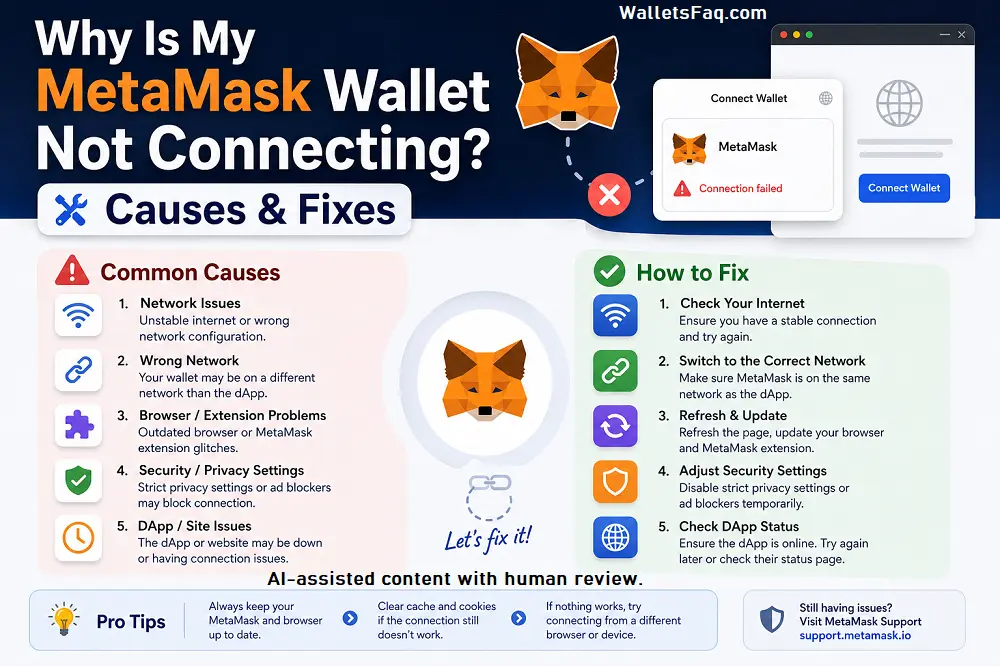
There are multiple reasons why users may face issues with the MetaMask connectivity. Without analyzing the causes, you won’t be able to figure out the solution that will go with your problem:
- MetaMask browser issue: When you use an unsupported or outdated browser with MetaMask, you’re sure to face connectivity issues. Some web browsers that MetaMask works best with are- Google Chrome, Brave, Mozilla Firefox, Edge, and Opera.
- Poor internet connectivity: If the network connection on your device is not stable or keeps on interrupting, then there are chances that MetaMask will have issues while communicating with the blockchain network. Slow internet connectivity is one of the strongest reasons behind MetaMask connectivity issues.
- Corrupted browser cache: When there are cached cookies or files on your device, it may hamper the functionality of MetaMask, leading to a failed wallet connection.
- Outdated MetaMask extension: When the MetaMask extension is outdated, it may cause connectivity issues with blockchain networks and websites.
- Incorrect network: There are several decentralized applications that work only with specific blockchain networks, such as Binance Smart Chain, Ethereum mainnet, or Polygon. If you connect your wallet to the wrong network, it may come up with connectivity errors.
- Wallet permission issues: When you try to connect your wallet to some websites, it may require permission to access your wallet address. If, somehow, the connection request is rejected, MetaMask will continue to block the site.
- Conflicting Browser Extensions: If you have installed ad blocker, security extensions, or privacy tools on your device, it may interfere with MetaMask scripts and prevent any successful connections.
Troubleshooting the MetaMask not connecting issue
In case your MetaMask wallet is not connecting, there are a few troubleshooting methods that you can try to get rid of the issue:
- Refresh and reconnect: Sometimes, just a simple refresh is what it takes to fix such glitches. To get rid of the problem, you can simply close the tab, reopen the website, and try to connect once again.
- Unlock MetaMask: Before you try to connect your wallet, ensure that your wallet is unlocked, since a locked wallet cannot approve the connection request.
- Check the selected network: Make sure that the wallet you are using is on the correct blockchain network, such as BNB Chain, Polygon, Ethereum, or any other chain.
- Clear cache and cookies: Old browser data within your device can lead to connectivity issues. Hence, you must clear your browser cache and cookies to fix broken sessions.
- Disable any conflicting extensions: If there are any privacy tools, ad blockers, or other wallet extensions on your device, disable them and try again.
- Update the browser and MetaMask: Make sure that your browser is updated to its latest version. Also, download any available MetaMask updates.
- Reinstall MetaMask: If the MetaMask extension appears to be corrupted, you can try to remove and reinstall it from the official sources. But make sure that you have your Secret Recovery Phrase before uninstalling it.
- Check the website status: When there is no issue with the MetaMask extension, there might be something wrong with the dApp or the blockchain network.
More tips to prevent the MetaMask connection failed problem
If you wish to avoid getting such errors in the future, you can try out the following solutions:
- Keep your browser updated
- Regularly update MetaMask
- Avoid installing too many browser extensions (Especially of different wallets)
- Use trusted dApps only
- Clear browser cache occasionally
- Double-check blockchain networks before connecting
Try this if MetaMask servers or RPC providers are down
Sometimes, the issue solely lies on RPC providers because they are the main components that let you communicate with the blockchain networks. If the RPC experiences downtime, you will face the ” MetaMask not connecting issue. In that case, you can do the following:
- Wait a few minutes and retry
- Switch to another RPC provider
- Check official MetaMask announcements for outages
Summing it up:
Though a little annoying, when the “MetaMask not connecting” issue shows up, instead of worrying, try to figure out the problem-causing agent and then apply one of the correlated solutions to get rid of the problem. Even if you do not experience any issue with MetaMask, make sure that your web browser is updated, you are using the latest version of MetaMask, and there is no conflicting software on your device.
Disclaimer: The information provided here is for educational purposes only and should not be considered financial advice. As the cryptocurrency market is highly volatile, it’s important to conduct your own research and carefully evaluate the market condition before making any investment decisions.