Trust Wallet has managed to create a long-standing presence in the crypto market. The wallet is one of the best ways to store your crypto, alongside allowing you to send and receive crypto assets easily. However, some users have reported to face issues while trying to check their wallet balance. Yes, users were not able to fetch their balance, or it disappeared suddenly for some tokens.
Hence, if you’re not able to view your account balance or are facing any other related issue, this article covers details that will help you come out of this problem. Instead of worrying that your funds are lost, you should try to take some action to get rid of the issue. Sometimes, it is just related to incorrect blockchain networks, hidden tokens, synchronization delays, and app glitches. But, no matter what the cause of the issue is, below you can find some fixes that will help you get rid of it. But first, finding out the actual cause is pretty necessary.
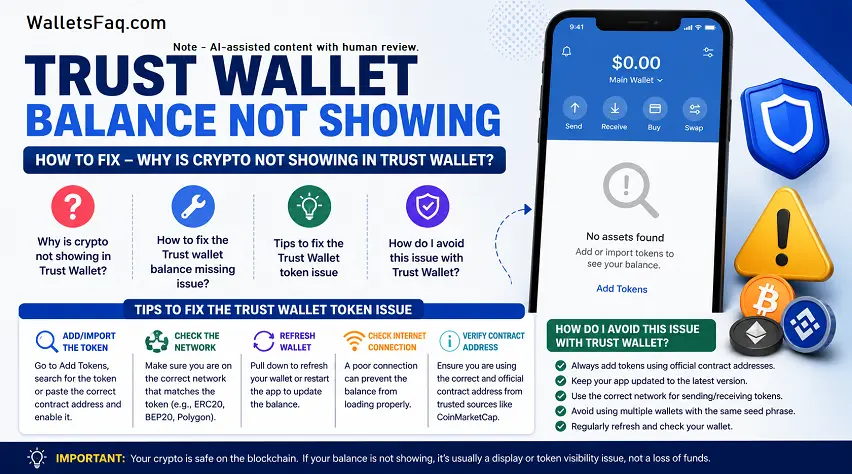
Why is crypto not showing in Trust Wallet?
In this section of the article, you will get to find out the most common reasons responsible for why your wallet may not be showing a balance. Since your assets are stored on the blockchain, there is no chance that you will lose them until you have the private keys. Below you can find a list of common causes behind the same:
- The token is temporarily hidden or disabled.
- You have chosen the wrong blockchain network.
- The app you’re using is outdated.
- The transaction is pending in the backend.
- Additionally, the token contract was not added properly.
- It has a temporary server or synchronization issues.
- There is a problem with the wallet restoration.
But don’t worry, there are some sure-shot solutions to these problems, and we’ll look at those solutions in the section to follow.
How to fix the Trust wallet balance missing issue?
In case you are unable to fetch the balance of your Trust wallet account, here are some working solutions you can try:
- Enable any tokens: You can do this by opening Trust wallet > select “Manage Tokens” > look for the missing token > turn on its toggle.
- Check the correct blockchain network: If you’re trading USDT, it exists on Tron, Ethereum, BNB Chain, and Solana. On the other hand, ETH-based tokens usually appear on Ethereum. Moreover, the BEP-20 tokens are available on the BNB Smart Chain. If you get to know that you’re on the wrong version, add the correct network version and cross-check the receiving address.
- Add the token manually: If you are trading new or custom tokens, they may not appear automatically inside the Trust Wallet. To add a custom token, select the “Manage Tokens” option > choose “Add Custom Token,” > choose the correct token contract address > Save the token.
- Update the Trust Wallet app: If you’re using an outdated app, it can sometimes display bugs or cause synchronization issues. To fix this issue, download the latest app update from the Google Play Store or Apple App Store.
- Verify transaction status: In case you have initiated a transaction not long ago, chances are the transaction is still processing. Hence, you can verify the transaction status to get some clarity.
- Refresh or restart the wallet: At times, the issue is not due to a major problem, but is due to basic technical glitches. In this scenario, you can simply close and re-open the app, refresh the wallet, restart your phone, switch internet connections, or reinstall the app.
Tips to fix the Trust Wallet token issue
When you are troubleshooting any issues with your Trust Wallet, chances are that you try different tips and tricks to fix the issue. However, during this time, you should not forget the safety of your wallet. Hence, you must avoid sharing the Secret Recovery Phrase of your wallet with anyone. Avoid seeking help from fake support accounts and phishing websites.
- Use official sources: Make sure that you only download and use Trust Wallet from the official sources. You can either get the app directly from their official website or from a direct link available on Google Play Store or Apple App Store.
- Cross-check any contract addresses: In case you add a wrong token address, some fake or worthless tokens may appear in your wallet. Make sure that you verify the token address carefully before importing it.
How do I avoid this issue with Trust Wallet?
Most Trust Wallet issues are easy to fix. However, what you can do is follow the easy solutions defined below to avoid facing any such problems in the future.
- Ensure to keep the app updated: Those who regularly install the latest available updates usually enjoy great wallet performance, enhanced security, and greater network compatibility.
- Try to get a clear understanding of the blockchain networks: Before you send or receive crypto, make sure that you have chosen the correct network, verify the compatibility of the wallet, and cross-check the addresses.
- Create a secure backup of the recovery phrase: We also recommend that you create a secure backup of the seed phrase and never share it with anyone. Do not take its screenshot, email it, or store it in cloud storage.
- Avoid unknown tokens: Be cautious of any suspicious airdrops or any random tokens that might be appearing in your wallet.
Concluding thoughts:
If you see a missing balance in your Trust Wallet, it can turn out to be pretty stressful, especially if you are a new crypto trader. However, many times, these issues are easy to resolve. Sometimes, it is not related to any major problem. Moreover, the reason could be as simple as incorrect networks, pending transactions, hidden tokens, or temporary app glitches. Since most of your crypto assets are stored on the blockchain, your funds are safe until you have the private keys and the secret recovery phrase of your wallet.
Disclaimer: The information provided here is for educational purposes only and should not be considered financial advice. As the cryptocurrency market is highly volatile, it’s important to conduct your own research and carefully evaluate the market condition before making any investment decisions.