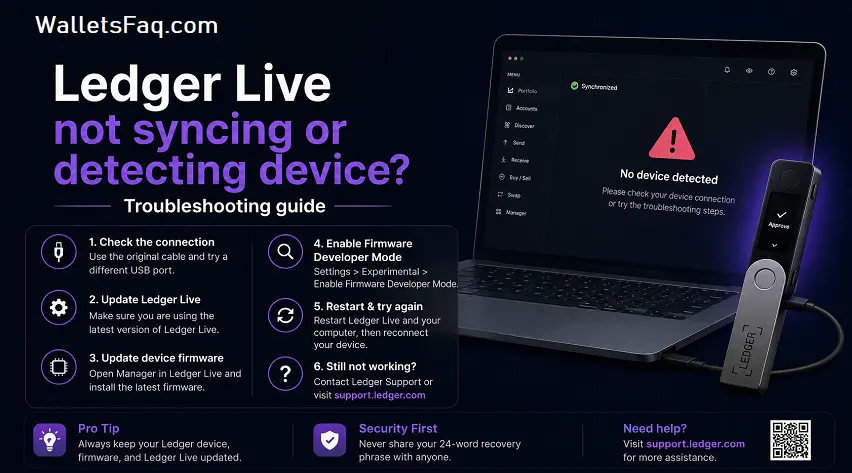
A Ledger hardware wallet is one of the most widely used and trusted tools when it comes to securing your digital assets. No matter how efficient a tool is, a Ledger device and its associated app may run into problems sometimes. One such problem that users often face is “Ledger Live not syncing or detecting device” and if something similar happens to you, you might be looking for some solutions to get rid of the issue.
This is what this article is going to be all about. However, before anything else, please note that you won’t be having access to your account balance, crypto management features, or transaction histories until you don’t get rid of the problem. The good news is that such issues related to synchronization and connection are easy to resolve. The information on the same can be easily found in the sections to follow.
What causes Ledger Live sync issues?
There can be multiple reasons that can lead to this issue. It could be due to software bugs or connectivity issues. Besides that, it could also be due to internet access, blockchain synchronization, or device miscommunication. Some of the common reasons for the same are:
- Outdated Ledger Live software
- Outdated device firmware
- USB connection problems
- Internet connectivity issues
- Firewall or antivirus restrictions
- Corrupted cache data
- Temporary blockchain synchronization delays
Ledger Live not working: Basic troubleshooting steps
When Ledger Live stops functioning correctly, start with the most basic fixes before moving to advanced solutions. Here are some of them:
- Restart Ledger Live: Close the application completely and reopen it. Temporary software glitches can often be resolved with a simple restart.
- Check your internet connection: Ledger Live requires a stable internet connection to synchronize blockchain data. Test your connection by opening websites or running a speed test.
- Update Ledger Live: Running an outdated version of Ledger Live may cause compatibility issues. Installing the latest version ensures access to security updates, bug fixes, and improved synchronization performance.
- Restart your computer: A system restart can refresh background processes that may be interfering with Ledger Live operations.
Ledger device not detected: How to fix it
One of the most common complaints among users is that the Ledger device is not detected when connected to a computer. Here are some common reasons why this might be happening:
- Check the USB cable: Not all USB cables support data transfer. Some cables only provide charging functionality. Use the original Ledger cable or a certified data-transfer cable.
- Try a Different USB port: A faulty USB port may prevent proper communication between the Ledger device and your computer. Testing alternative ports can help isolate the issue.
- Unlock your Ledger device: Ensure the device is powered on and unlocked with the correct PIN. Ledger Live cannot communicate with a locked device.
- Enable required permissions: On supported cryptocurrencies, features such as “Blind Signing” or specific application permissions may need to be enabled directly on the Ledger device.
- Close conflicting applications: Wallet software, browser extensions, or crypto management tools running simultaneously may interfere with Ledger Live’s ability to detect the device.
How to resolve Ledger Live not syncing accounts issue?
If your Ledger device connects successfully but account balances fail to update, synchronization issues may be affecting Ledger Live. Here are a few things you can try:
- Clear the Ledger Live cache: Corrupted cache files can prevent account information from updating properly. Clearing the cache forces Ledger Live to refresh blockchain data.
- Re-add the account: Removing and re-adding the affected account can often restore synchronization functionality without impacting your funds.
- Verify blockchain status: Sometimes, the issue is not with Ledger Live itself. Blockchain network congestion or temporary service interruptions can delay synchronization.
- Update device firmware: Outdated firmware can create communication issues between Ledger Live and your hardware wallet. Hence, keep your firmware updated to the latest version.
- Disable antivirus or firewall temporarily: Certain security programs may block Ledger Live’s network communication. Temporarily disabling them can help find out whether they are causing the issue.
- Reinstall Ledger Live: Uninstall and then reinstall Ledger Live to fix the issue related to corrupted software or configuration errors.
Best practices to prevent future Ledger connection problems
Taking any preventive measures beforehand can help you avoid any Ledger Live issues in the future. Here is what you can try:
- Keep software updated: Make sure that you regularly update Ledger Live, device firmware, and the operating system of your device.
- Use reliable USB accessories: Low-quality cables and USB hubs frequently cause device detection issues. Direct connections are generally more reliable.
- Protect your recovery phrase: While troubleshooting, never share your 24-word recovery phrase with anyone. Legitimate support representatives will never request this information.
Read – Ledger Hardware Wallet Review 2026
Conclusion:
If you are constantly facing Ledger Live not syncing or detecting device issue, using the information given in this article will certainly help you. It can be a really frustrating issue when you are not able to access your wallet and take necessary actions. But knowing the causes along with the solutions and preventive measures can help a lot.
Disclaimer: This content has been published with the aim of providing information to visitors. Do not consider this to be any kind of financial advice. Since cryptocurrency is highly volatile, we recommend that you “Do Your Own Research” before investing.